“The focus will be on supporting businesses to transition and the government will therefore not be mandating MTD for any new taxes or businesses in 2020.”
MTD for income & corporation tax was scheduled to come into effect from 2020, but as the UK prepares itself for Brexit, HMRC has redirected its focus on the implications of UK’s exit from the EU.
HMRC has said that its digital delivery team and business analysis team are being redeployed to focus on ensuring that a customs solution will be in place should it be required when the UK leaves the EU.
With the current perplexity surrounding Brexit, HMRC has stressed that ‘this does not indicate any expected outcome but is due to the level of work required to deliver any outcome’.
https://www.taxfile.co.uk/wp-content/uploads/2015/11/Houses-of-Parliament-Big-Be.jpg350350Taxfilehttps://www.taxfile.co.uk/wp-content/uploads/2020/03/taxfile-logo-2020.pngTaxfile2019-06-05 13:45:352021-10-31 19:33:47Making Tax Digital (MTD) delayed due to Brexit
From 1st of April 2019 HMRC’s VAT Notice 700/22 will come into effect; Making Tax Digital (MTD) for Value Added Tax (VAT). The MTD initiative is believed to benefit HMRC on two levels.
It will help to ensure the correct VAT is being paid to HMRC, & seeing that VAT accounts for the highest unpaid tax in the UK (35%), the government has estimated that it will generate £610M in 2020-21 from eliminating erroneous returns.
The MTD initiative will also save HMRC money as it will no longer have the cost associated with maintaining the VAT portal where submissions are currently made, estimating a saving of £10M a year of taxpayers’ money.
HMRC’s long-term vision is to have one of the most digitally advanced tax administration systems in the world & they hope that by 2020 they will have MTD applied to all of UK’s taxation processes.
For this vision to be fulfilled it is believed that they will then strive to have all taxation data recorded in the Standard Audit File for Tax (SAF-T) format. Once this is achieved, HMRC will be able to undertake tax & VAT investigations frequently & randomly with very little cost, as it will free up resources from having to obtain & enter the data for analysis.
Being VAT registered means that your annual income equals or exceeds the current threshold value of £85,000.00. Currently, any business or individual registered for VAT, whether on a Flat Rate Scheme or on the Standard Rate, will from April 2019 need to prepare for the changes outlined by Notice 700/22.
When will it be applicable to me?
The 1st quarter of your VAT return that startson, orafter 1st April 2019.
Am I exempt from MTD?
Groups or individuals exempt from MTD include;
those with religious beliefs that prevent them from using technology
those going into insolvency
those that it is reasonably impractical to do so (eg. geolocation, physical &/or mental disabilities – that prevent the use of technology)
What are my responsibilities?
You will need to ensure that all your transactions (expenses & sales) are individually recorded digitally with a MTD-compliant software. You still need physical &/or electronic copies of these records stored for at least 6 years. The MTD-compliant software is then used to calculate & submit your VAT returns.
What should my ‘digital’ data look like?
From April 2019 all digital record keeping will include;
Business Name
Business Address
VAT Registration Number
VAT Account Schemes
Information about Supplies & Sales
All Supplies & Sales invoices should include;
a Tax Point Date
Sequential (alpha-)numerical labelling format
Itemisation of services/goods
NET amount clearly shown
VAT rate & VAT amount clearly stated
Currently, the date, NET & VAT amount all need to be digitally stored for each-and-every-one of your transactions. It is also recommended that a digital upload of your bank feed is included to back the entries for both expenses & sales. VAT will then be calculated using these digital entries & submitted to HMRC via the compliant software used to record them.
https://www.taxfile.co.uk/wp-content/uploads/2019/03/Making-Tax-Digital-MTD-thumbnal.png177300Taxfilehttps://www.taxfile.co.uk/wp-content/uploads/2020/03/taxfile-logo-2020.pngTaxfile2019-03-15 11:56:372021-10-31 19:35:26Making Tax Digital for VAT
HMRC have been busy, behind the scenes, shaking things up with regard to the personal data they hold on UK taxpayers. They’ve been pulling in – rather successfully – personal data from various different government departments and bringing all that data into one central place for both them and us to see, whenever the need arises. This is all part of their longer-term plan for Making Tax Digital or ‘MTD’ as it’s known in the tax and accounting world. So, with that in mind, this is the first in a series of posts that introduces MTD and a crucial part of that; Personal Tax Accounts (PTAs). In this series of articles we’ll discuss what MTD will mean for most of us, we’ll look at the kinds of data that will be stored, see how it’ll affect us and, lastly, see if there is anything that we’ll need to do.
Personal Tax Accounts (PTAs)
One of the core elements of MTD is the Personal Tax Account (PTA). In years to come, each UK individual is likely to become very used to logging into their Personal Tax Account on the HMRC website. In fact, these already exist and most, if not all, UK taxpayers can already access them if they want to. When accessed, it’s quite interesting to see the huge amount of data already accessible via your own PTA if you care to take a look. You may be surprised just how much data they contain for you.
For those not yet ready to take the plunge, we’ve taken a look for you, as you’ll see. And, so far, we are quite impressed.
First, though, perhaps you’d like to sign up to view your PTA account for the first time. If you do this you can perhaps follow along with our notes and see how similar records in your PTA are to those in our demonstration account. For example, we found the National Insurance Record and resulting State Pension Forecast of particular interest, but that’s just indicative of many different areas available in the new PTAs. Before starting, though, take a look at our quick word about security* because it’s important to keep your personal details safe and out of harm’s way.
Anyway, if and when you’d like to take a look at your own PTA, head off to this page which will give you various options depending on whether you already have a Government Gateway account (to clarify, you will need a Government Gateway account before you can gain access to your PTA). If you’ve used HMRC online services before, you’ll already have a Government Gateway account. If not, follow the instructions on that page in order to set one up for the first time. To do that, you’ll need your National Insurance (NI) number and proof of identity which can include your bank account details, a P60, your 3 most recent payslips or your passport number and expiry date. It takes about 15 minutes to set up if you have these to hand.
When first logging in as a new user, the HMRC system may prompt you to set up an additional level of login security. For example, setting up access codes by SMS (you’ll then be sent a code to enter into the screen when logging in, to prove you are who you say you are. You’ll be sent a new access code to your mobile phone every time you sign in. It’s rather like 2FA (2 Factor Authentication) for those who are familiar with that).
You may additionally be asked some security questions, again to protect your data from hackers. In my test I was asked for my full name, date of birth, passport number and similar information (quite a bit actually). This type of heavy duty disclosure is another reason to make sure you have read our security* pointers before disclosing anything sensitive online.
Welcome to your Personal Tax Account (PTA)
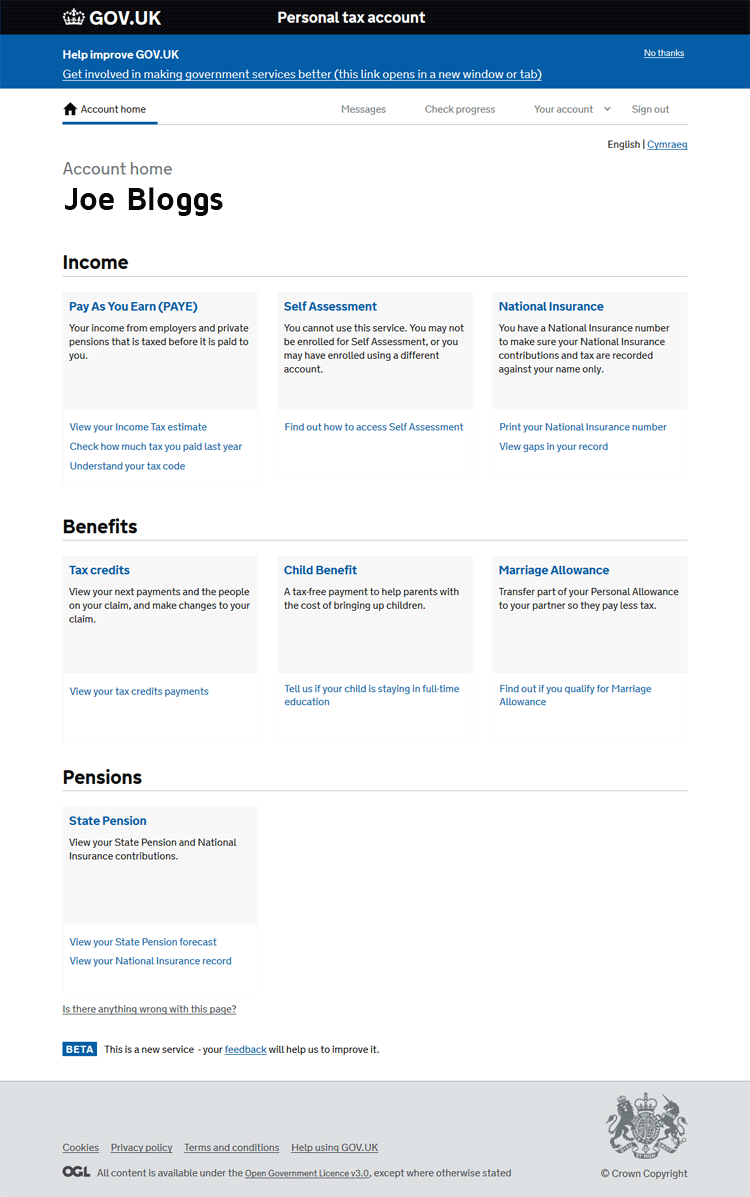
Once logged in you’ll be met with a screen similar to the image shown right, with your name at the top:
As you can see, it contains several sections. From your Personal Tax Account, you can:
Check your PAYE tax code, see an estimate of the Income Tax you’ll pay and more;
Check your Self Assessment details (or enrol) and view personal tax returns submitted in the past;
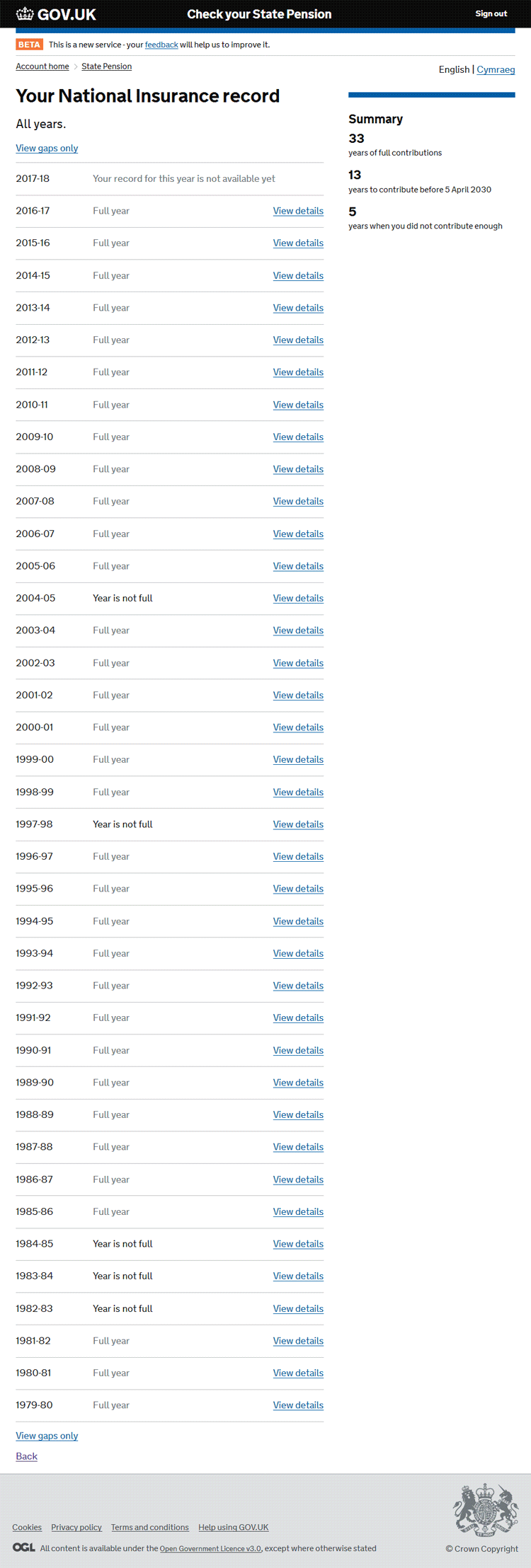
View your National Insurance record;
Check and amend your Tax Credits record;
Tell HMRC about any changes that might affect any Child Benefit you receive (e.g. tell HMRC if your child is staying in education or training if they were aged 16 on or before 31 August);
View and potentially update details about any Marriage Allowance if applicable to you (if you’re married or in a civil partnership and earn less than £11,500 you may be eligible);
View an entire history of your National Insurance (NI) contributions;
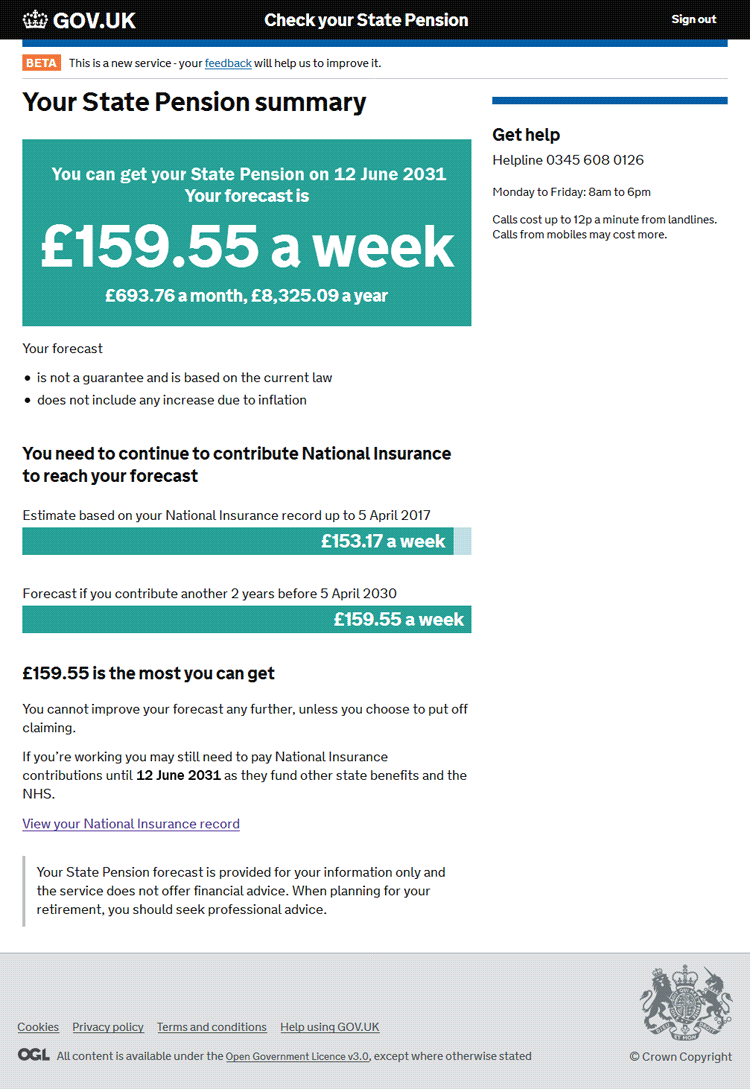
Check when you can claim your State Pension;
See a forecast of how much you may receive for your State Pension when the time comes.
https://www.taxfile.co.uk/wp-content/uploads/2017/10/Making-Tax-Digital-Header.jpg566849Markhttps://www.taxfile.co.uk/wp-content/uploads/2020/03/taxfile-logo-2020.pngMark2017-10-30 16:21:102021-10-31 19:48:54Making Tax Digital (‘MTD’), Part 1 — Your Personal Tax Account
We may request cookies to be set on your device. We use cookies to let us know when you visit our websites, how you interact with us, to enrich your user experience, and to customize your relationship with our website.
Click on the different category headings to find out more. You can also change some of your preferences. Note that blocking some types of cookies may impact your experience on our websites and the services we are able to offer.
Essential Website Cookies
These cookies are strictly necessary to provide you with services available through our website and to use some of its features.
Because these cookies are strictly necessary to deliver the website, refusing them will have impact how our site functions. You always can block or delete cookies by changing your browser settings and force blocking all cookies on this website. But this will always prompt you to accept/refuse cookies when revisiting our site.
We fully respect if you want to refuse cookies but to avoid asking you again and again kindly allow us to store a cookie for that. You are free to opt out any time or opt in for other cookies to get a better experience. If you refuse cookies we will remove all set cookies in our domain.
We provide you with a list of stored cookies on your computer in our domain so you can check what we stored. Due to security reasons we are not able to show or modify cookies from other domains. You can check these in your browser security settings.
Other external services
We also use different external services like Google Webfonts, Google Maps, and external Video providers. Since these providers may collect personal data like your IP address we allow you to block them here. Please be aware that this might heavily reduce the functionality and appearance of our site. Changes will take effect once you reload the page.