Don’t delay – book an appointment with Taxfile today or call 0208 761 8000 and we’ll sort it all out for you. We have staff who speak English, Polish, Pashto, Dari, Russian, Malayalam, and Dutch, should you need them on the day. Our Tulse Hill office is at 25 Thurlow Park Road, London SE21 8JP. Call 0208 761 8000 or book an appointment — the first 20 minutes is free! Alternatively, you can have a ‘virtual’ appointment with us on Zoom, Teams, Google Hangouts, Skype, FaceTime, WhatsApp or whatever you prefer.
We’re open from Monday to Saturday in April & May including early evenings on Mon/Tues
Our Tulse Hill office is open 6 days a week during April & May and offers Saturday morning appointments plus early evening appointments on Mondays and Tuesdays if standard office hours do not suit you (please see the footer of this website for details or simply call us).
At Taxfile, we understand that the cost of living is hitting everyone’s pockets. That’s why we have taken bold action to make things a little easier for our valued CIS (Construction Industry Scheme) clients earning less than £40k. We are dropping our prices like never before! Now, you can benefit from our expert services for just £220 +VAT (£264). That’s right – we have slashed our prices by £55 to make sure you keep more of your hard-earned money where it belongs: in your pocket.
Why Choose Taxfile?
With over 25 years of experience, we know a thing or two about providing reliable, friendly, and expert accountancy services. Unlike other accountants, we pride ourselves on being approachable and accessible. When you work with us, you’re not just another number – you are part of our Taxfile community.
The internet is full of agents promising you huge tax rebates, but the truth is, many of these so-called “experts” leave you at risk of being investigated by HMRC. Taking shortcuts with your taxes can be costly in the long run. At Taxfile, we do things the right way – no dodgy deals, just honest, professional advice you can trust.
Our invoices will have an additional £6 HMRC investigation cover fee, which means you are protected from additional costs if HMRC decides to investigate your tax return. At a total cost of £270, not only will we calculate and submit your tax return, but we will support you after its completion.
We value your trust in us. That is why we offer a £35 referral fee for every new CIS client you recommend. So, why not share the love and put some extra cash in your pocket?
We hope to be leading the way by giving access to affordable, professional accountancy services. Together we can build a stronger and more financially secure community, bucking the trend of rising costs.
Contact Taxfile
Our team of friendly, experienced agents are here to make your life easier. We know times are tough, and we’re doing everything we can to ensure our services remain affordable and accessible.
https://www.taxfile.co.uk/wp-content/uploads/2025/03/CIS_Price_Cut.jpg623900Taxfilehttps://www.taxfile.co.uk/wp-content/uploads/2020/03/taxfile-logo-2020.pngTaxfile2025-04-23 15:20:412025-06-11 18:51:22Lower Prices for CIS Clients – We’re on Your Side!
Understanding the Employer Payment Summary (EPS) monthly claims for limited companies within the CIS
Limited company contractors operating within the Construction Industry Scheme (CIS) have distinct payroll obligations, including the submission of their Employer Payment Summary (EPS). In today’s guide, we’ll explain what the EPS is, its purpose, and the submission rules limited companies have to follow if they work within the Construction Industry Scheme.
What is the EPS?
The Employer Payment Summary serves as a crucial mechanism for limited company contractors to report additional payments, deductions, and adjustments to HM Revenue & Customs (HMRC) alongside their regular payroll submissions. While all such employers submit a monthly EPS, limited company contractors operating under CIS have specific considerations due to their status and the nature of their work within the construction industry.
The purpose of submitting monthly EPSs for Limited Company Contractors in the CIS
The primary purpose of EPSs for limited company contractors operating within the CIS is to provide HMRC with accurate information about deductions suffered under the Construction Industry Scheme. By submitting each monthly EPS for CIS, limited company contractors also ensure compliance with CIS regulations and provide HMRC with essential data for tax calculations and entitlements.
Submitting an EPS for Limited Company Contractors working within the CIS
Limited company contractors operating within CIS are required to submit an EPS to HMRC every month, even if there are no adjustments to report. EPSs should be submitted after the end of the tax month but before the 19th of the following month, in line with HMRC guidelines.
Contractors can use HMRC’s online services or compatible payroll software to submit their monthly EPS for CIS. It’s crucial to ensure that the information provided in each EPS accurately reflects the deductions suffered under CIS.
The CIS deductions suffered sent through an EPS are promptly reflected as a credit on the PAYE account. This credit will then be utilised to set off against other liabilities, including PAYE tax, National Insurance Contributions (NIC), and subcontractor’s tax submitted through the CIS300 return.
When sending the EPS you can also claim Employment Allowance and recover statutory payments that exceed the amount of PAYE due.
Submitting EPSs late may lead to penalties imposed by HMRC, which can vary based on the extent and frequency of delays.
CIS Accountancy Help from Taxfile
At Taxfile, we can provide guidance on compliance requirements, tax calculations, and record-keeping practices.
Get in touch today for any accountancy or tax issue that needs expert help.
https://www.taxfile.co.uk/wp-content/uploads/2024/03/EPS-Guide-FEAT.jpg8611080Taxfilehttps://www.taxfile.co.uk/wp-content/uploads/2020/03/taxfile-logo-2020.pngTaxfile2024-03-13 11:30:052025-03-13 12:16:42Guide to the Employer Payment Summary (EPS) – for Limited Companies within the CIS
The CIS Contractor’s Monthly Return is a mandatory requirement for contractors operating within the Construction Industry Scheme (CIS). It acts as a mechanism for contractors to disclose to HM Revenue and Customs (HMRC) payments issued to subcontractors and the corresponding tax deductions withheld from those payments. By providing HMRC with information regarding payments rendered and the accompanying tax deductions, the CIS Contractor’s Monthly Return guarantees transparency and adherence to regulations within the construction sector. In today’s guide, we explain the various components of the monthly ‘CIS300’ return, how the process works, key deadlines, the ramifications of non-compliance, and much more.
Key Components of the Monthly Return
The CIS Contractor’s Monthly Return typically includes the following key components:
1. Contractor Details
This section includes information about the contractor, such as their name, Unique Taxpayer Reference (UTR), and contact details. Ensuring accuracy in this section is crucial for HMRC’s records and communication purposes.
2. Subcontractor Details
Contractors must provide details of all subcontractors they have engaged during the reporting period. This includes the subcontractors’ names, UTRs, and payment amounts.
3. Payments Made
Contractors must report the total payments made to each subcontractor during the reporting period. This information helps HMRC track payments within the construction industry and verify compliance with tax obligations.
4. Tax Deductions
Contractors are required to calculate and report the tax deductions made from payments to subcontractors. The deducted amounts are typically based on the subcontractors’ verification status and tax treatment under the CIS.
5. Total Amount Due
The Monthly Return concludes with the calculation of the total amount due to HMRC, taking into account the tax deductions made from payments to subcontractors.
Deadlines and Reporting Periods
The CIS Contractor’s Monthly Return deadlines follow a structured timeline, which includes:
The submission deadline — contractors must submit their Monthly Returns to HMRC by the 19th of each month following the end of the reporting period. (Contractors’ payments to HMRC must also be made by this date).
The reporting period covered by each Monthly Return — which typically spans from the 6th of the previous month to the 5th of the current one.
Making Your CIS Payments to HMRC
Once you’ve calculated the total CIS deductions, prepare to make the payment to HMRC. You will need to have the following information ready:
Your Unique Taxpayer Reference (UTR) number;
Your payment reference, which is your 13-character Accounts Office reference number followed by the letter ‘C’ (e.g., 123PA12345678C);
A contractor who operates as a limited company and also acts as a subcontractor might find that they are exempt from making any payments to HMRC. Subcontractors who do not have gross payment status will incur CIS deductions, which can then be used to offset any CIS payments owed to HMRC. This is exclusively available to limited companies. Please look out for our forthcoming blog focused on the CIS claim — a hyperlink will follow here once it’s live.
Implications of Non-Compliance
Failure to meet CIS Contractor’s Monthly Return deadlines can lead to various consequences, which may include the following:
Penalties — HMRC may impose penalties for late or non-submission of Monthly Returns, which can escalate over time.
Loss of benefits — non-compliance with CIS obligations, including Monthly Return deadlines, can lead to loss of benefits such as gross payment status, affecting contractors’ cash flow and competitiveness.
Managing the CIS Monthly Return Process
For contractors, efficiently managing the CIS Contractor’s Monthly Return process involves the following steps:
1. Maintain Accurate Records
Contractors should maintain accurate records of payments made to subcontractors and tax deductions applied. This includes keeping track of invoices, receipts, and CIS statements.
2. Timely Submission
The Monthly Return must be submitted to HMRC by the 19th of each month following the end of the reporting period. Contractors should ensure timely submission to avoid penalties and maintain compliance.
3. Use HMRC Online Services
HMRC provides online services for submitting CIS returns, making the process convenient and accessible for contractors. Registering for and using these online services can streamline the submission process and reduce administrative burdens.
The CIS Contractor’s Monthly Return is the key tool through which to report payments and tax deductions accurately to HMRC. Understanding its components and effectively navigating the submission process helps to ensure that contractors are compliant — and also avoids unnecessary penalties.
Whether you’re new to self-employment and have just started to run your own business, or have been doing it for a while – the fact is: Making Tax Digital (‘MTD’) is coming and it would be best to get set up in the right way, now.
Record-Keeping for Making Tax Digital
Keeping your personal life & your business completely separate is the best policy. It keeps things streamlined and will also save you money when your tax agent comes to do your bookkeeping & tax returns. So:
Set up a separate bank account just for your business;
Pay for your expenses from this account;
Pay income from your sales into it;
Keep an ongoing file for each tax year, where you put all your expenses, receipts & invoices;
Include copies of your sales invoices in that file too;
Keep the file in monthly order, so that accountants/tax advisors like Taxfile can easily cross-check the invoices to the bank statements and analyse your costs accurately.
Setting Up Digitally
Making Tax Digital means that you must run your business through a digital traceable source. The best way to do this is to allow us, if we are your tax agent/accountant, to set up your bank statements to feed automatically into accounting software like ‘Xero’. Alternatively, we can accept bank statements downloaded in CSV format, which we would then transfer to Excel spreadsheets.
Cash & Card Sales
If you are making cash & card sales, set up an app on your smartphone like ‘Sum Up’ or ‘Square’ so that you will be complying with MTD – your bank can also supply you with a PDQ card reader to accept your cash/card sales. We can upload your sales reports from these services and include them in your sales figures.
Accurate record-keeping is the cornerstone of every successful business
Moving to Quarterly Reporting
Here at Taxfile, we can currently run your bookkeeping for you quarterly or annually. However, when HMRC implement MTD fully in 2026, tax returns will need to be submitted each quarter — no longer just once a year. We’re therefore recommending that everyone gets used to sending in their bookkeeping records quarterly.
Quarterly bookkeeping also allows us to monitor your sales turnover and alert you at the appropriate time if you are approaching the level of sales that would require you to get registered for VAT. Finding out at the end of the year that you have already gone over the threshold — and should have been charging VAT at an earlier date — can be very costly.
Contact Taxfile – for All Your Tax & Accounting Needs
We’re Tax Advisors & Accountants in Tulse Hill and Dulwich, South London
Come and chat with one of our friendly team in the Tulse Hill office about getting things set up & ready in good time. Or call for a telephone appointment to discuss what will be best suited to your particular business operations.
Whether you are a sole trader with no staff or subcontractors for a larger concern, we are here to help every size of business get set up on the right path — for getting MTD-ready.
https://www.taxfile.co.uk/wp-content/uploads/2024/02/Setting-Up-for-Making-Tax-D.jpg8611080Taxfilehttps://www.taxfile.co.uk/wp-content/uploads/2020/03/taxfile-logo-2020.pngTaxfile2024-02-22 17:15:512025-03-13 12:23:56Setting Up for Making Tax Digital
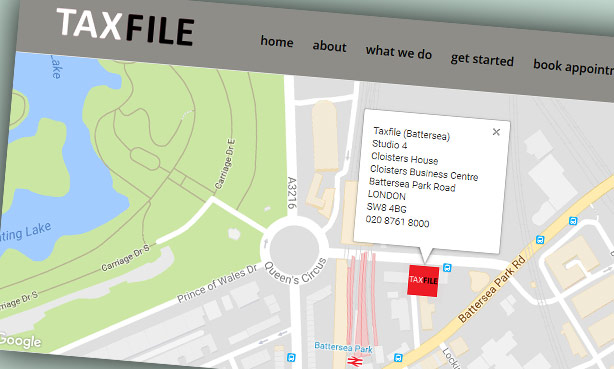
Our new branch is now open in Battersea, London SW8. You’ll find it very convenient if you work nearby — we’re at Cloisters Business Centre, near Battersea Park Station, just off Battersea Park Road (A3205). You can park easily too – just pull into the business centre and you’ll find us opposite the church, on the ground floor with the brown door (unit 4). Come and see us there too if you’re an existing client and find Battersea more convenient than our Tulse Hill and Dulwich Village offices.
During April & May, the Battersea branch is open from 11am right through to 7pm from Monday to Thursday — so you don’t need to take a day off work to come and see us. On Fridays we’re open 11am to 3pm by appointment and Faiz will be a familiar face to many that day.
The new Battersea branch will especially suit construction workers in the building industry, which is very active in this location. Contractors who have set up as limited companies will find our CIS work, payroll and bookkeeping services very useful, affordable and convenient. Meanwhile, sub-contractors will like the fact that we’re experts at getting workers tax refunds and rebates, particularly if they’ve been working within the Construction Industry Scheme (‘CIS’). We claim thousands back from HMRC on their behalf every year.
Call 020 7821 9444 for a free 20 minute consultation at the Battersea branch, or 020 8761 8000 for Tulse Hill, Dulwich and all other branches.
https://www.taxfile.co.uk/wp-content/uploads/2018/05/Battersea-Branch-SW8.jpg369614Markhttps://www.taxfile.co.uk/wp-content/uploads/2020/03/taxfile-logo-2020.pngMark2018-05-11 15:23:302021-10-31 19:42:59New Battersea Branch – Now Open in London SW8!
HMRC have been busy, behind the scenes, shaking things up with regard to the personal data they hold on UK taxpayers. They’ve been pulling in – rather successfully – personal data from various different government departments and bringing all that data into one central place for both them and us to see, whenever the need arises. This is all part of their longer-term plan for Making Tax Digital or ‘MTD’ as it’s known in the tax and accounting world. So, with that in mind, this is the first in a series of posts that introduces MTD and a crucial part of that; Personal Tax Accounts (PTAs). In this series of articles we’ll discuss what MTD will mean for most of us, we’ll look at the kinds of data that will be stored, see how it’ll affect us and, lastly, see if there is anything that we’ll need to do.
Personal Tax Accounts (PTAs)
One of the core elements of MTD is the Personal Tax Account (PTA). In years to come, each UK individual is likely to become very used to logging into their Personal Tax Account on the HMRC website. In fact, these already exist and most, if not all, UK taxpayers can already access them if they want to. When accessed, it’s quite interesting to see the huge amount of data already accessible via your own PTA if you care to take a look. You may be surprised just how much data they contain for you.
For those not yet ready to take the plunge, we’ve taken a look for you, as you’ll see. And, so far, we are quite impressed.
First, though, perhaps you’d like to sign up to view your PTA account for the first time. If you do this you can perhaps follow along with our notes and see how similar records in your PTA are to those in our demonstration account. For example, we found the National Insurance Record and resulting State Pension Forecast of particular interest, but that’s just indicative of many different areas available in the new PTAs. Before starting, though, take a look at our quick word about security* because it’s important to keep your personal details safe and out of harm’s way.
Anyway, if and when you’d like to take a look at your own PTA, head off to this page which will give you various options depending on whether you already have a Government Gateway account (to clarify, you will need a Government Gateway account before you can gain access to your PTA). If you’ve used HMRC online services before, you’ll already have a Government Gateway account. If not, follow the instructions on that page in order to set one up for the first time. To do that, you’ll need your National Insurance (NI) number and proof of identity which can include your bank account details, a P60, your 3 most recent payslips or your passport number and expiry date. It takes about 15 minutes to set up if you have these to hand.
When first logging in as a new user, the HMRC system may prompt you to set up an additional level of login security. For example, setting up access codes by SMS (you’ll then be sent a code to enter into the screen when logging in, to prove you are who you say you are. You’ll be sent a new access code to your mobile phone every time you sign in. It’s rather like 2FA (2 Factor Authentication) for those who are familiar with that).
You may additionally be asked some security questions, again to protect your data from hackers. In my test I was asked for my full name, date of birth, passport number and similar information (quite a bit actually). This type of heavy duty disclosure is another reason to make sure you have read our security* pointers before disclosing anything sensitive online.
Welcome to your Personal Tax Account (PTA)
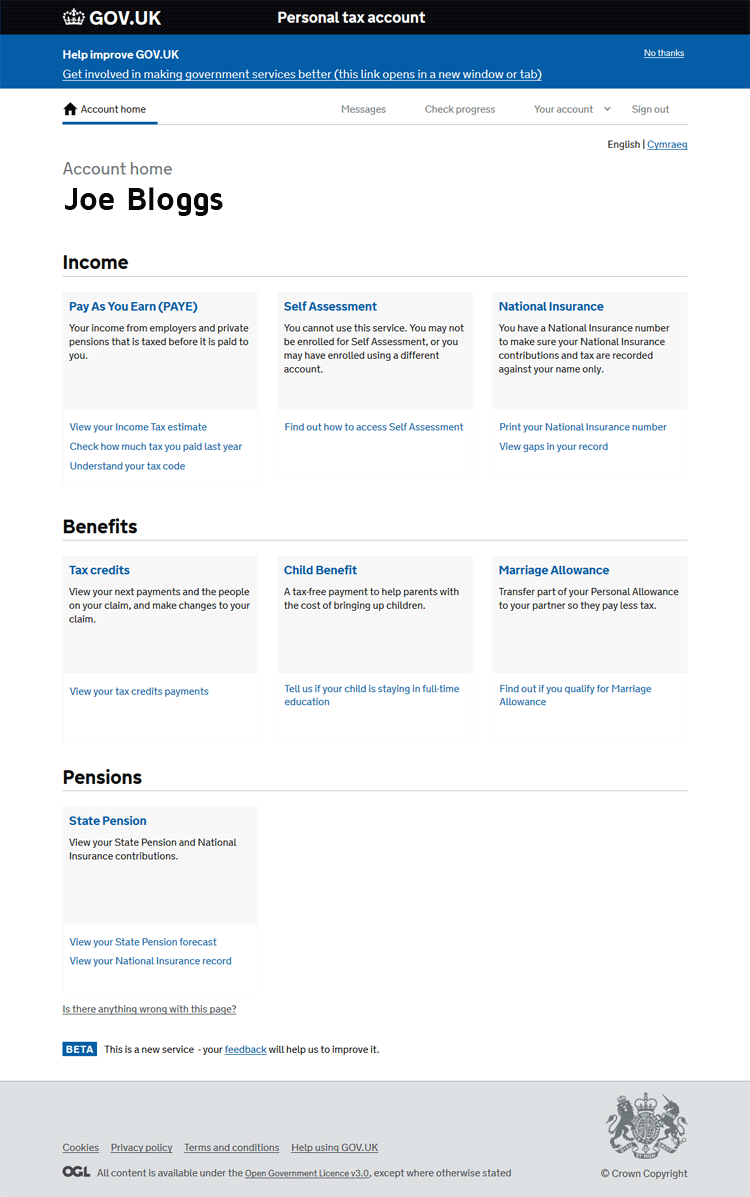
Once logged in you’ll be met with a screen similar to the image shown right, with your name at the top:
As you can see, it contains several sections. From your Personal Tax Account, you can:
Check your PAYE tax code, see an estimate of the Income Tax you’ll pay and more;
Check your Self Assessment details (or enrol) and view personal tax returns submitted in the past;
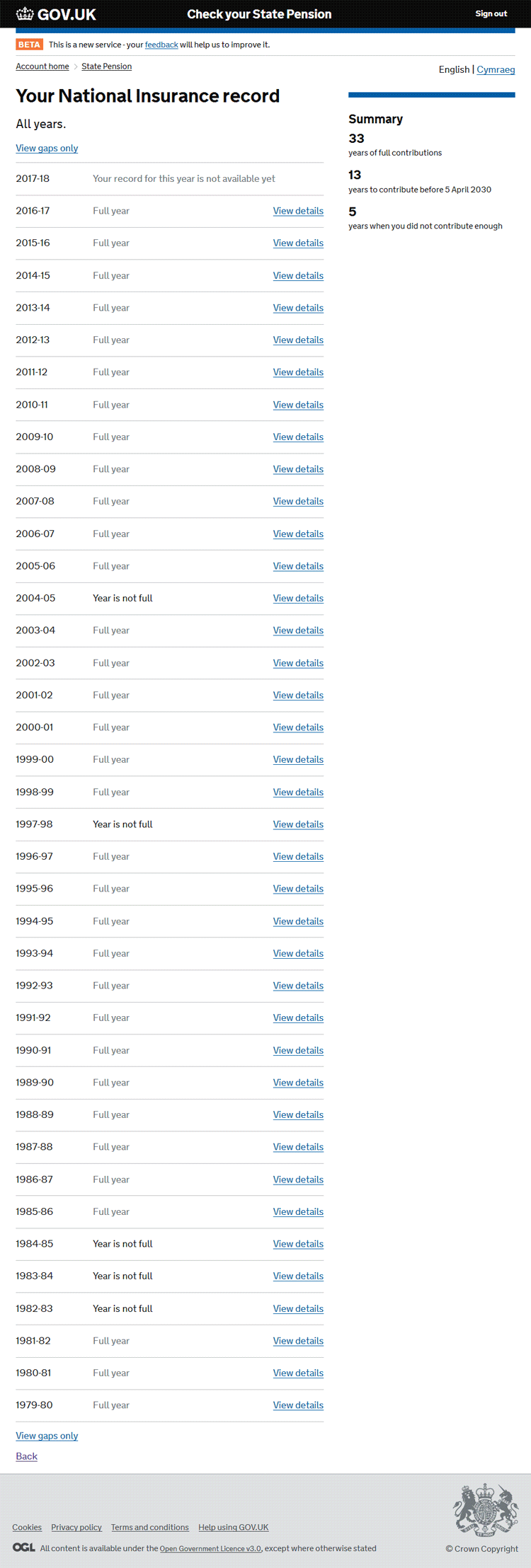
View your National Insurance record;
Check and amend your Tax Credits record;
Tell HMRC about any changes that might affect any Child Benefit you receive (e.g. tell HMRC if your child is staying in education or training if they were aged 16 on or before 31 August);
View and potentially update details about any Marriage Allowance if applicable to you (if you’re married or in a civil partnership and earn less than £11,500 you may be eligible);
View an entire history of your National Insurance (NI) contributions;
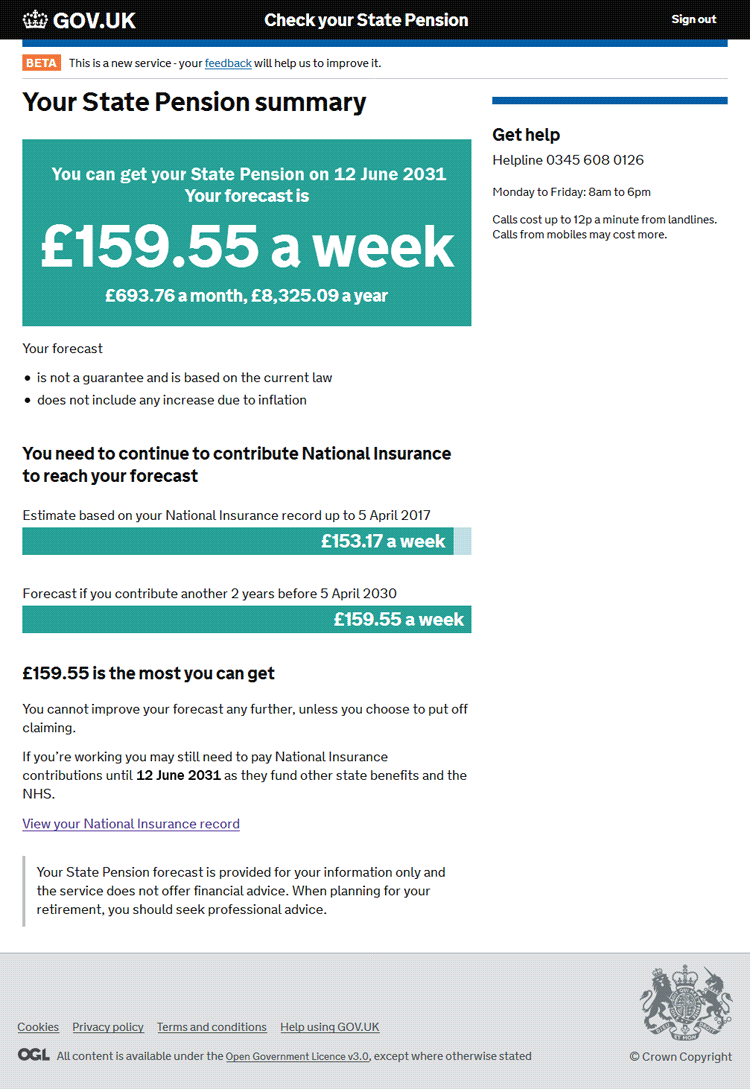
Check when you can claim your State Pension;
See a forecast of how much you may receive for your State Pension when the time comes.
https://www.taxfile.co.uk/wp-content/uploads/2017/10/Making-Tax-Digital-Header.jpg566849Markhttps://www.taxfile.co.uk/wp-content/uploads/2020/03/taxfile-logo-2020.pngMark2017-10-30 16:21:102021-10-31 19:48:54Making Tax Digital (‘MTD’), Part 1 — Your Personal Tax Account
[UPDATED]: Calling all subbies! Claim your refund in time for Christmas AND get a 5% discount on Taxfile prices if you submit your records to us before 21st December!
If you’re a sub-contractor working in the UK construction industry, the first thing you should do is register for CIS (the Construction Industry Scheme). This gives you your own unique tax reference and you effectively become self-employed from a tax standpoint. Taxfile can help set you up on the CIS system (we charge just £36 + VAT for this at time of writing).
Once enrolled, any earnings will automatically be taxed, at source, at 20%. However, with the personal allowance being set at around £10,600 per annum in most cases, this means that many subbies will have overpaid tax and will be due a refund at the end of the tax year. Taxfile are experts at recovering this type of tax for construction workers. We can analyse income, offset any applicable expenditure and allowances, work out the correct National Insurance and income tax, then submit an accurate tax return. 9 out of 10 subbies using Taxfile receive a tax refund within 3 to 4 weeks, many of those receiving in excess of £1000. Taxfile do more than 500 of these annually and Read more
https://www.taxfile.co.uk/wp-content/uploads/2020/03/taxfile-logo-2020.png00Markhttps://www.taxfile.co.uk/wp-content/uploads/2020/03/taxfile-logo-2020.pngMark2014-10-21 09:20:572025-01-10 13:17:23C.I.S. Subbies: claim your refund for Christmas!
We may request cookies to be set on your device. We use cookies to let us know when you visit our websites, how you interact with us, to enrich your user experience, and to customize your relationship with our website.
Click on the different category headings to find out more. You can also change some of your preferences. Note that blocking some types of cookies may impact your experience on our websites and the services we are able to offer.
Essential Website Cookies
These cookies are strictly necessary to provide you with services available through our website and to use some of its features.
Because these cookies are strictly necessary to deliver the website, refusing them will have impact how our site functions. You always can block or delete cookies by changing your browser settings and force blocking all cookies on this website. But this will always prompt you to accept/refuse cookies when revisiting our site.
We fully respect if you want to refuse cookies but to avoid asking you again and again kindly allow us to store a cookie for that. You are free to opt out any time or opt in for other cookies to get a better experience. If you refuse cookies we will remove all set cookies in our domain.
We provide you with a list of stored cookies on your computer in our domain so you can check what we stored. Due to security reasons we are not able to show or modify cookies from other domains. You can check these in your browser security settings.
Other external services
We also use different external services like Google Webfonts, Google Maps, and external Video providers. Since these providers may collect personal data like your IP address we allow you to block them here. Please be aware that this might heavily reduce the functionality and appearance of our site. Changes will take effect once you reload the page.














 [UPDATED]: Calling all subbies! Claim your refund in time for Christmas AND get a 5% discount on Taxfile prices if you submit your records to us before 21st December!